Search This Blog

Showing posts with label google. Show all posts

Thursday, June 2, 2011

Google Launches +1 button & Twitter Launches The Follow Button for Websites!

Twitter and Google have each launched, respectively, a Follow and +1 button for use on your website. Increase your online reach and opportunities among potential residents! Your status and availability will increase when visitors to your site can in one-click Follow you on Twitter or in one-click +1 you to their Google friends. Visitors who follow your business via social media are more likely to interact with your business, recommend you in their networks, retweet/repost your information.


Twitter's Follow
Twitter launched the Follow button for use on websites May 31, 2011. This Follow button allows all visitors of your site to click their mouse once and begin following your business on Twitter. You can customize the button with a background color, your follower count, and language choice.


Google's +1
Google launched the +1 button for websites on June 1, 2011. The +1 button serves as a tour guide in Google search results. Internet users logged in to their Goggle accounts are now able to recommend websites by clicking the +1 button instead of copying the link to share in an email, on Facebook, Twitter, a blog, or use on other sites. By simply clicking the +1 button users visiting your site will recommend you to their friends, networks, and the world. A user's +1 will show on your website and next to your website in any Google search or on Search Ads.

Read more here or watch the video below for a quick overview.


Let us know how these buttons affect your websites!

Monday, May 2, 2011

Google Places on Google Maps! Claim it. Own it. Rock it!

Your listing on Google Places affects the information provided on Google Maps. Google Maps obtains information from many different sources; as Google states, "our listings combine information from our web search results, data submitted directly by local business owners, and third-party sources such as publicly available Yellow Pages directories."

By claiming your Google Places listing, you can instill confidence in internet users visiting your listing because the information you provide will be marked as 'by owner' and displayed at the top of your listing on Google Maps. This information includes the following:
  • location: street address
  • phone and fax numbers
  • email address
  • website
  • short description
  • categories for your business
  • business hours
  • payment options
  • photos
  • videos
  • additional information: type of parking available
See the two sets of instructions below to claim your business listing on Google Places and start adding high priority results to Google's search engine!


How to Claim Your Business Listing in Google Places on Google Maps


1. Go to http://www.maps.google.com. Search for your community using the search engine. Click on ‘more info’ to the right of your community’s name. If Google Maps cannot locate your community, click the ‘Report a problem’ link under the list of search results and follow instructions titled "How to Create a Business Listing with Google Places on Google Maps" later in this post.
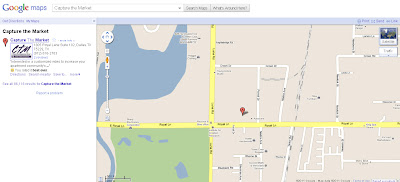
2. Click ‘Business owner?’ located at the top right of your listing.
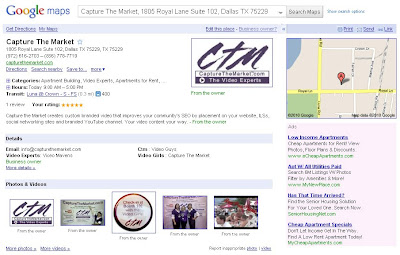
3. Login to your Google Account or click ‘Create an Account Now’ and follow the instructions.
4. Choose ‘Edit my business information’ and click ‘Continue.’
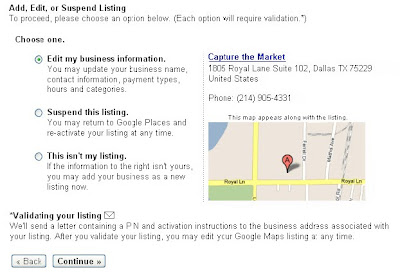
5. Enter the requested information and click ‘Submit.’
6. Choose to verify via phone call, SMS or text, or postcard. Recommendation: phone call.
7. Verify ownership by entering the PIN.


How to Create a Business Listing with Google Places on Google Maps

1. Go to http://www.maps.google.com. Search for your community using the search engine. If Google Maps cannot locate your community, click the ‘Report a problem’ link under the list of search results.
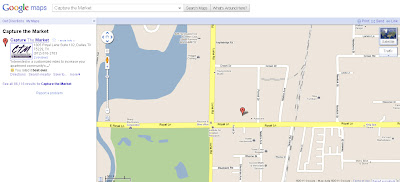
2. Choose ‘A place is missing from Google Maps’ and click ‘Continue.’
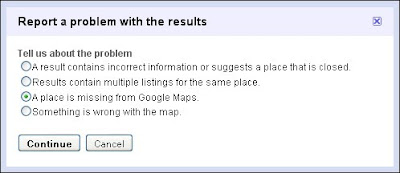
3. Login to your Google Account or click ‘Create an Account Now’ and follow the instructions.
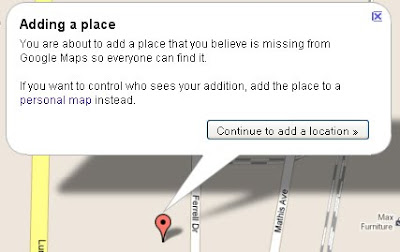
4. Click ‘Continue to add a location.’
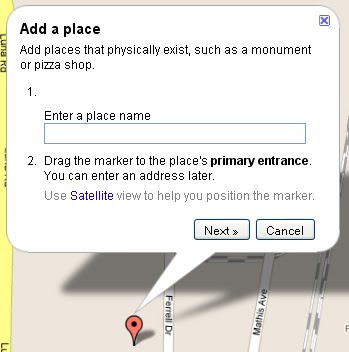
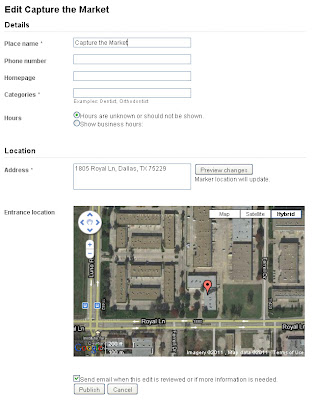
5. Enter your community’s name, click and drag the marker to your community entrance if needed, and click ‘Next.’
6. Enter all of your community’s information: Place Name, Phone Number, Homepage (if applicable), Categories (apartments, apartment building, furnished apartments etc), Hours, and Address. Click the checkbox next to ‘Send email when this edit is reviewed…’ and click ‘Publish.’


Troubleshooting

If you haven’t heard from Google in a couple of days, go to http://www.maps.google.com. Search for your community using the search engine. If you find your community, follow the steps on Page 1.

Your Online Presence - Claim it. Own it. Rock it!

Online listing services and search engines can determine a lot about your business from various sources. These services and search engines are clever, but sometimes they find outdated or incorrect information about your business.
You will be able to provide more information, deals, photos and videos, and links on your claimed listings which will benefit you directly with better targeting and ranking. If you claim your listings, hackers and spammers will be unable to hijack your online presence, and internet users will trust your provided information.

This week we will be posting daily instructions on how to claim your listings on various sites and search engines. Our schedule is as follows (If you're uncertain about a site, click on the name to view our listing on the site):

Schedule of Instructional Posts
May 2: Google Places
May 3: Foursquare
May 4: Facebook Places (merges with Business Page)
May 5: Yelp
May 6: Bing Local
May 7: CitySearch
May 8: Yahoo! Local


Once you claim your listings, only you will be able to edit the information which will halt the spread of incorrect information and eliminate the risk of hijackers. Some sites and search engines will take up to 6 months in the verification process. Be patient. Once your updated information is online, the correct information will feed to and impact hundreds of listings and search engines.

Have Listings on Other Sites?
Comment and let us know what other site(s) you are interested in claiming. We'll add instructions to this blog on how to claim listings on your choice of sites.